How Many Lines of Code Does it Take to Clean an Address?
a very subjective comparison of R and Python for address parsing and standardization, and generally string analysis
Around two years ago I decided to take a hard line and soley program in R as an epidemiologist. In this field, R is the preferred language in recent years for its data cleaning, visualization, package network, and it is also free. Though I eventually found R to be superior to SAS in all of these categories it was the idea of developing a skill-set that would stay with me throughout my career, and be relevant in other disciplines as well.

My first large project using R for the entire workflow involved the cleaning of address data, which is often manually entered by hospital staff and practitioners. This data needed to be fed into a geocoder, which contains a list of all the correct addresses for the given state. This process involves an algorithm, which classifies the addresses, matches those with very high confidence, and provides the user each questionable match and the potential predictions.

As the address data was highly subject to error, manually going through even a subset of 55,000 records would not be feasible. Minor changes in address components like direction, the type of road (suffix) can drastically reduce the time investment for manual review. I must re-emphasize that this is a very biased comparison; although I was at a similar level of competency in R as I am now with python, there are a few key differences to note
- at the time I was unaware of dplyr and the tidyverse, as I was self taught from a book that sparsely mentioned the package
- as a result I approached this project using base R syntax for data cleaning, which is verbose and redundant
Importing Data
I have to confess again, this would be greatly simplified with the use of dplyr in R, however I will compare the two import code blocks to demonstrate how a newcomer might approach this in R and Python, and to demonstrate my growth!
The dataframe needed a certain and specific set of ‘ZP’ and ‘GC’ address information for pre-processing in the ZP4 program following initial cleaning. And the variable names have to be as such (and yes, need to be capitalized)
Code Comparisons
in R
#install.packages("knitr")
#install.packages("stringr")
#install.packages("remotes")
#remotes::install_github("slu-openGIS/postmastr")
#manually install data.table using R GUI
#install.packages("foreign")

library(stringr)
library(dplyr)
library(knitr)
library(postmastr)
library("data.table")
library(foreign)

src <- read.csv("edr1.csv", header = TRUE, sep=",",quote = "\"",
                dec = ".", fill = TRUE, comment.char = "",
                                                       stringsAsFactors=FALSE)
names(src) <- c("control","add","city","county","state",
                "zip" )

obs <- length(src$control)

#setting blank data-frame
tmp <-  setNames(data.frame(matrix(ncol=25, nrow=obs)),
                 c("RECID","ADDRESS","CITY","ZIPCODE","COUNTY","ADDTYPE","GC_ID","ADDWORK",
                   "NOTE","GCST","GCCITY","GCZIP","GCSTATE","GCCOUNTY","GCSOURCE","GCNOTE",
                   "ZPST","ZPCITY","ZPSTATE","ZPZIP","ZPCOUNTY","ZP1","ZP2","ZP3","ZPFLAG"
                   ))
#assinging select columns from original data, and creating unique identifier

blank <- ""
fw <- "                                                                                                        "

tmp$RECID   <-c(src$control)
tmp$ADDRESS <-c(src$add)
tmp$CITY    <-c(src$city)
tmp$ZIPCODE <-c(src$zip)
tmp$GC_ID   <-seq(1:obs)
tmp$COUNTY  <-c(src$county)
tmp$GCCITY  <-c(src$city)
tmp$GCZIP   <-c(src$zip)
tmp$GCSTATE <-c(src$state)
tmp$GCCOUNTY    <-c(src$county)

tmp$GCST    <-  rep(blank, times=obs)
tmp$ZPST    <-  rep(blank, times=obs)
tmp$ZPCITY  <-  rep(blank, times=obs)
tmp$ZPZIP   <-  rep(blank, times=obs)
tmp$ZPSTATE <-  rep(blank, times=obs)
tmp$ZPCOUNTY    <-  rep(blank, times=obs)
tmp$ZP1 <-  rep(blank, times=obs)
tmp$ZP2 <-  rep(blank, times=obs)
tmp$ZP3 <-  rep(blank, times=obs)
tmp$ZPFLAG  <-rep(0, times=obs)
tmp$ZPNOTE  <-  rep(blank, times=obs)

tmp$GCST[1] <- fw
tmp$ZPST[1] <-  fw
tmp$ZPCITY[1]   <-  fw
tmp$ZPZIP[1]    <-  fw
tmp$ZPSTATE[1]  <-  fw
tmp$ZPCOUNTY[1] <-  fw
tmp$ZP1[1]  <-  fw
tmp$ZP2[1]  <-  fw
tmp$ZP3[1]  <-  fw

tmp$ZPNOTE[1]   <-  fw

#not neccesary if a 5 digit zip field is already present
tmp$GCZIP   <- str_sub(tmp$GCZIP,1,5)
in Python
import pandas as pd

df = pd.read_csv('data.csv')

df.columns = ["RECID","ADDRESS","CITY","COUNTY","GCSTATE","ZIPCODE"]

cols = ["ADDTYPE","GC_ID","ADDWORK","NOTE","GCST","GCCITY","GCZIP","GCCOUNTY","GCSOURCE",
        "GCNOTE","ZPST","ZPCITY","ZPSTATE","ZPZIP","ZPCOUNTY","ZP1","ZP2","ZP3","ZPFLAG"]

def emptydata(cols):
    for col in cols:
        df[col] = ''
    return df

emptydata(cols)
Subsetting data via string analysis
When working with columns of a dataset in both R and Python, there are a certain set of functions that can and cannot be performed on the variable, depending on whether it currently exists in the data frame or as a separate series.
-
the key difference is that when features taken outside the dataframe in python, there are more inherent operations that can be carried out in base syntax as they are objects with their own set of functions, whether as a list or pandas series
-
in R you are still working with more lengthy functions often outside base syntax. From my perspective the functions for a vector within a dataframe, and an independent vector are the same.
in R
#subsetting data into 2 tables, depending on character or numeric prefix

#extract fist word of address
st <- c(tmp$ADDRESS)
first <- word(st, 1)

# if first string is numeric, take out and append numeric row indexer
# use indexer to create binary variable

isnumeric <- str_extract(first, "[[:digit:]]+")
tmp$nump <- ifelse(is.na(isnumeric),NA,1)

ischar <- str_extract(first, "[[:alpha:]]+")
tmp$charp <- ifelse(is.na(ischar),NA,1)


#change subset name depeding on data set
ed.alt <- subset(tmp, charp==TRUE) #selects adresses with character prefix
ed.main <- subset(tmp, nump==TRUE) #selects adresses with numeric prefix (has house number)
One particularly useful feature of ‘pandas’ is the ability to chain multiple functions in sequence using periods. One basic example is shown below but here’s another example where subsetting and plotting can be achieved in one line
data[['col1','col2','col3']].groupby('col1').sum().plot(kind='bar')
In R, this is possible using dplyr, where each functions output is sent to the next in sequence using ‘pipes’. In my experience pandas has a steeper learning curve than dplyr. dplyr sequences are more readable but pandas chained functions are incredibly succinct and powerful.
in Python
df['first_sub'] = [add.split()[0] for add in df['address']]
df_num = df[df['first_sub'].str.isdigit()]
df_char = df[df['first_sub'].str.isalpha()]
Address Typing
in R
# if address is off a highway, route, or county road, 88.
# if address is listed as an intersection of two streets, 3.

obs <-length(st)
atype <- rep("", times=obs)
i <- 1

for (add in st){

    n.words <- unlist(strsplit(add, " +"))

    for (sub in n.words){

    if(sub %in% int.sec){atype[i] <- "3"
break}

else if(sub %in% rt.list){atype[i] <- "88"}

else if(atype[i] == "") {atype[i] <- "1"}
}

i <- i+1

}
The advantage here for python is that indexing on the original object is not necessary as the alias is defined in the for statement. This makes the code more readable, and if you needed an iteration counter and wanted to index (say for an additional column for row wise comparison within the loop), you can use ‘enumerate’ to provide each value of the object and a counter - without the need to use (i+1) or worry about i going beyond the range for the object being looped upon.
before further parsing addresses into chunks, it is advantageous to split off those which do not meet the standard format (highway mile markers, crossroads). P.O. boxes were filtered out in the previous step. so after this, all addresses of type ‘1’ will start with a house number and contain a single street name.
in Python
df['a_split'] = [sub.split() for sub in df['address']]
atypes = []

for add in df['a_split']:

    atype='1'

    for sub in add:

        if sub in int_sec:
            atype = '3'

        elif sub in rt_list:
            atype = '88'

    atypes.append(atype)
In Summary
The remainder of my original R script repeats similar loops (though some more nested and faceted than others) for the remainder of address chunks, and concatenates the final product into a standardized address. I primarily re-coded the examples above to see if python would have been the more logical tool for this problem. However, the extensive looping originally performed may not be necessary at all. Here’s why:
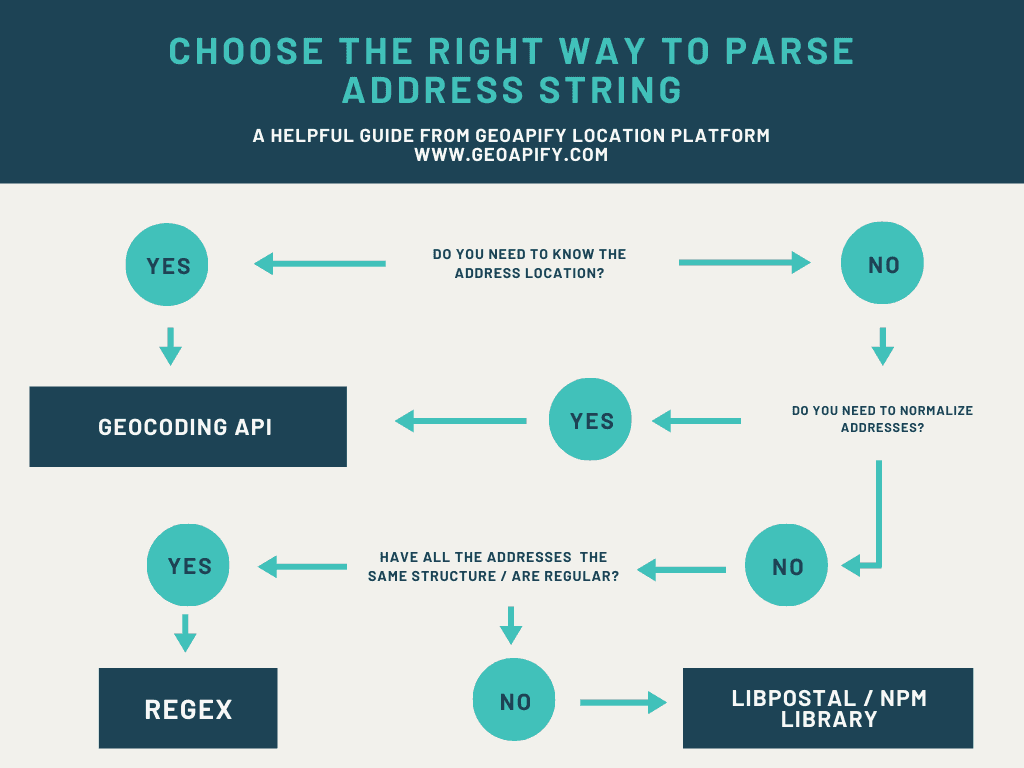
Before the manual string analysis and formatting was done, the majority of addresses were parsed into chunks and formatted using the ‘postmstr’ library. The library missed many elements however, and incorrectly modified some addresses. Thus the manual data cleaning. This R library was not maintained and seemed to be the only viable address parsing tool available. Python appears to have far more library’s for address parsing, such as libpostal which is currently maintained with a commit 1 month ago and utilized by open street map. Due to the lack of address parsing tools for R, I would go with python if I were to repeat this project again.
That being said, sometimes manual REGEX string analysis is the best option, depending on the quality of your data. If the address data is exceptionally poor as it was in this case, a library is still the best first step as shown in the following flow chart.